Also called: form group.A fieldset is a group of multiple form components or elements.
GitHub
Figma
Fieldset component preview
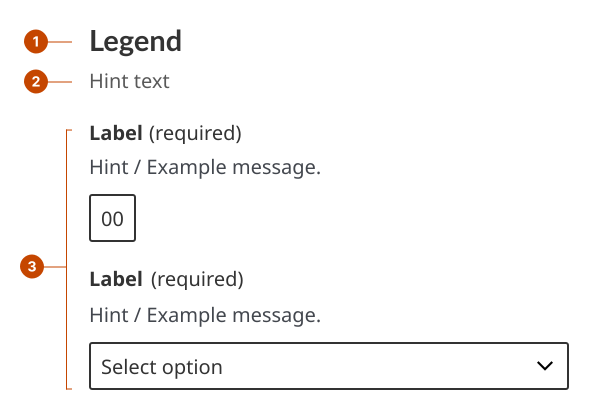
Fieldset anatomy
The fieldset legend acts as a heading to identify the grouped form components that follow. Legend text is left aligned and in sentence case (only the initial letter is capitalized).
The fieldset hint text gives specific requirements for completing the grouped form components successfully.
The component grouping is the group of related form components that the legend describes.
Design and accessibility for fieldsets
A fieldset combines the fieldset and legend elements to group together related form fields or components. It helps users of screen readers understand that inputs are all related to that question.
Group information
Group together form elements that are part of a task or are related in some way.
Avoid using fieldset when you have a single form field that asks for a single piece of information.
Write fieldset content to support task success
Write a short descriptive statement or a call to action for the legend caption to let a person know what information the fieldset group is asking.
Identify the subtask in the legend to help people understand the relationship between the information you’re requesting and the task they’re completing.
Help us improve Have questions or a request? Give feedback on our contact form. Something's wrong? Raise it through GitHub with an account. You'll have access to the team's direct responses, progress made on your issue, and issues raised by others. Give feedback Report an issue on GitHub 2026-06-04