Also called: dates, dateinput, date, memorable date.A date input is a space to enter a known date.
GitHub
Figma
Date input component preview
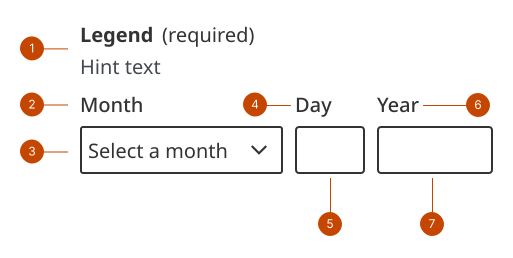
Date input anatomy
The fieldset legend states the information a person should enter in the date input field. Text is left-aligned and in sentence case (only the initial letter is capitalized). For the date input component, the fieldset is typically labelled as “date” or with the specific date type sought. The hint text shows the format of the date.
The month label identifies the month field.
The month input field can be a dropdown of written months to select from, or an input to enter 1-2 digits.
The day label identifies the day input.
The day input field can be 1 or 2 digits.
The year label identifies the year input field.
The year input field is limited to 4 digits.
Design and accessibility for date inputs
Select a format that assists with data entry
Use a format that matches the format of the information you’re asking for. For example, if you are asking for a birth date from a health card, use the Y/M/D format.
Support task success with hint text
Use the hint text in the fieldset legend to help a person understand the format they can use to enter the date. For example, showing a single digit number without a leading zero, like September 7, rather than September 07 shows that a leading zero is not needed.
Write specific error messages
Write error messages for each field of the date input. Error messages must provide information on what is missing or on incorrect formatting. For example, if the year was input using 2 digits, state that the year should be 4 digits. Help us improve Have questions or a request? Give feedback on our contact form. Something's wrong? Raise it through GitHub with an account. You'll have access to the team's direct responses, progress made on your issue, and issues raised by others. Give feedback Report an issue on GitHub 2026-05-25