Also called: text box.A textarea is a space to enter long-form information in response to a question or instruction.
GitHub
Figma
Textarea component preview
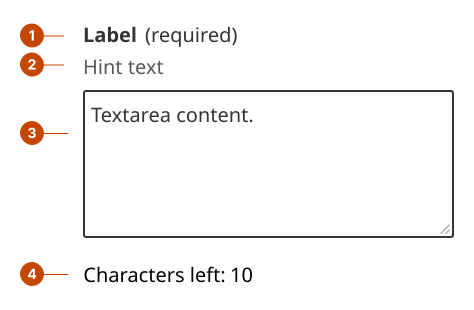
Textarea anatomy
The textarea label states the information a person should enter in the field. Label text is left aligned and in sentence case (only the initial letter is capitalized).
The hint text (optional) communicates specific requirements for each textarea to support task success.
The field is the container a person interacts with to provide their response.
The character count (optional) indicates the character limit that can be entered in the textarea.
Design and accessibility for textareas
Write a short, specific, unique textarea label
Ask only for the information you need using as few words as possible. Phrasing as a question can make a label unnecessarily long.
Choose unique labels for each textarea and input within a page. A person browsing fields will hear the label text in rapid succession without cues to tell which label is for which context.
Avoid using technical jargon, like “subject email address” or “account ID”. Instead be specific and personal, “full name”, “child’s age”.
Avoid using colloquialisms and common verb phrases that are unfamiliar to non-fluent speakers.
Explain any term that may not be clear. For example, “Bio (tell us a bit about your background).
Hide the label only when the purpose is clear
Visually hide the label only when the purpose of the textarea is clearly communicated by surrounding context, making the label visually redundant, such as in:
chat or messaging interfaces
search components
tables or other space-constrained layouts
Always provide a label to support assistive technologies.
Omit hint text if you hide the label, as it can lack context and be distracting or confusing.
Limit the use of placeholder text
In forms, avoid using placeholder text to replace a label or to convey instructions or information a person needs to remember, as it can create accessibility issues.
Outside of forms, use placeholder text only to reinforce a purpose that is already clear from visible context (for example, in search or conversational interfaces).
Support task success for textareas with hint text
Add hint text to help a person filling in a textarea to provide a complete value.
Write hint text to be instructional, brief, and specific.
Add character count to set expectations for text length
Add character count to limit how many characters can be entered into the textarea.
The character count shows remaining characters as they are entered, setting expectations and helping people respond with the right level of detail.
Write error messages for required textareas
Use error messages to address missing and invalid entries.
Write an error messages for all required inputs. If a field is optional, avoid using an error messages.
Avoid blaming the person using the product. Instead, tell them exactly what to do to move forward.
Help us improve Have questions or a request? Give feedback on our contact form. Something's wrong? Raise it through GitHub with an account. You'll have access to the team's direct responses, progress made on your issue, and issues raised by others. Give feedback Report an issue on GitHub 2026-09-09