GC Design SystemComponents
GC Design System Start to use Page templates overviewBasic page Components overviewAlertBreadcrumbsButtonCardCheckboxesContainerDate inputDate modifiedDetailsError messageError summaryFieldsetFile uploaderFooterGridHeaderHeadingIconInputLanguage toggleLinkNoticePaginationRadiosScreenreader-onlySearchSelectSide navigationSignatureStepperTableTextTextareaTheme and topic menuTop navigation CSS Shortcuts overview Reset styles Responsive layoutState Box sizingContainer sizingDisplayOverflowPositionVisibility FontFont familyFont sizeFont styleFont weightLine heightLink colourLink sizeLink text decorationList styleText alignText colourText overflowText transformWord break MarginPadding Align contentAlign itemsAlign selfFlexFlex directionFlex growFlex shrinkFlex wrapGapGrid columnsGrid rowsJustify contentJustify itemsJustify selfOrderPlace contentPlace itemsPlace self Background colourBorder colourBorder radiusBorder styleBorder width Icon namesIcon sizeImage CursorPointer eventsTransition Styles overviewDesign tokensColourSpacingTypography Contact usGet InvolvedFind a demo

Stepper
<gcds-stepper>

Also called: progress indicator, steps. A stepper is a progress tracker for a multi-step process.

Stepper component preview

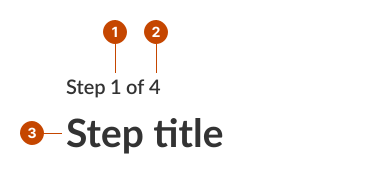
Stepper anatomy

  • The current step indicates the step the person’s on in the process.
  • The total steps indicates the number of steps overall in the process.
  • The step title describes the type of information that will be asked in the step.
A stepper anatomy represented by three elements: the current step, the total steps, and the current step title.

Design and accessibility for steppers

Always include the step title after the stepper

The step title and the stepper are a heading on the page. This is a H1, H2, or H3, depending on the heading hierarchy of the page.

Assign a goal to each step in your sequence

  • Choose a step title that reflects the goal of each step.
  • Make sure the actions in each step support the stated goal.
Help us improve Have questions or a request? Give feedback on our contact form. Something's wrong? Raise it through GitHub with an account. You'll have access to the team's direct responses, progress made on your issue, and issues raised by others. Give feedback Report an issue on GitHub
2026-02-17