Also called: sidebar menu, lefthand nav, vertical navigation.A side navigation is a vertical list of page links on the left side of the screen.
GitHub
Figma
Side navigation component preview
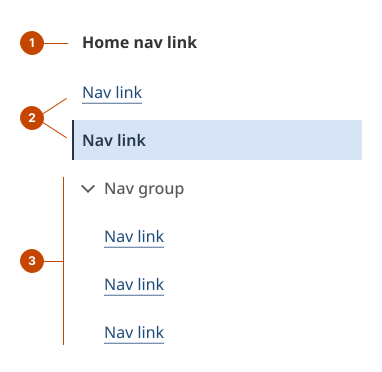
Side navigation anatomy
The home nav link identifies the site using text or a logo and it links to the home page. It uses a nav link that is added within the home slot.
The nav link takes a person to a page. The link is highlighted in blue to indicate the current page state.
The nav group displays the group name and expands and collapses the submenu. The submenu is a list of related nav links that are revealed when the nav group expands. The chevron icon points right when the submenu is hidden and down when it’s revealed.
Design and accessibility for side navigation
Set the home nav link
The home nav link can be a shorter version of the full name.
For logos, include descriptive text.
Choose meaningful nav link text
Make link text clear and specific to help a person decide if they should leave the current page. Spell out where a person will go or what they’ll find when they select a link.
Keep link text short and distinctive so a person can scan the links and find what they’re looking for.
If using breadcrumbs, align the content hierarchy in both sets of links, so each component reflects a similar path through the site.
Tip: Read nav link text aloud in sequence to note similarities in how link text sounds when read by an assistive device.
Add navigation groups to the side navigation
Opt to include a second or third level with a navigation group to the side navigation.
Use a hierarchical structure of up to 3 levels to categorize and order nav group items in a logical manner.
Nest items into categories consistent with the product’s information architecture.
Organize nav group items
Generally, order top level items by importance or highest priority for the person using your service.
Logically group like items in category sets and base your ordering on the type of information in a set and what it will be used for.
For known-item searching, order the links alphabetically – or numerically for items represented by numbers.
Use a sequential order for sets of process-based tasks or information that is time based that could follow a natural chronological order.
Test category names, divisions, and ordering to use the words and mental models that will be most intuitive to people using them.
Help us improve Have questions or a request? Give feedback on our contact form. Something's wrong? Raise it through GitHub with an account. You'll have access to the team's direct responses, progress made on your issue, and issues raised by others. Give feedback Report an issue on GitHub 2025-05-06