Also called: search bar, site search box, search field.Search is a space for entering keywords to find relevant information.
Required on Canada.ca
GitHub
Figma
Search component preview
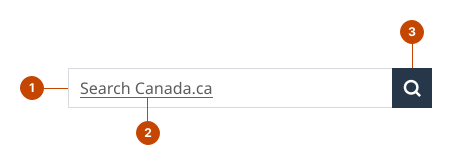
Search anatomy
The input field is a space to enter search keywords.
The placeholder text is a prompt visible before a person types. It identifies the search area.
The button, labelled with a magnifying glass, initiates a search.
Design and accessibility for search
Check search requirements
Here’s what’s required for search on GC sites.
Search is required in the header on Canada.ca standard and campaign pages.
It’s optional for other Canada.ca pages and GC sites.
Always include the search in the header of a standard or campaign page and maintain the default settings.
Use default GC Search indexing.
Set indexing across Canada.ca content or at an institution or program level.
Canada.ca site-wide search
Use “Search Canada.ca” as the search prompt text in English.
Use “Rechercher dans Canada.ca” as the search prompt text in French.
Institution, program, or product specific search
Use “Search [institution/program/product]” as the search prompt text in English.
Use “Rechercher dans [institution/programme/produit]” as the search prompt text in French.
Avoid acronyms unless necessary to shorten text for visual accessibility.
Note: As an exception, pages solely intended for a public service audience may apply a customized search indexation in particular contexts.Opt to add a search for other datasets within the content area of the page.
Opt to set up an additional search
If a secondary search is needed with other datasets, place that search within the content area of the page.
Clearly identify the search area, so a person searching understands the constraints ahead of time.
Help us improve Have questions or a request? Give feedback on our contact form. Something's wrong? Raise it through GitHub with an account. You'll have access to the team's direct responses, progress made on your issue, and issues raised by others. Give feedback Report an issue on GitHub 2026-03-09