Also called: title, section heading, subheading.A heading is a title that establishes levels of hierarchy to organize page content into a structure.
GitHub
Figma
Heading component preview
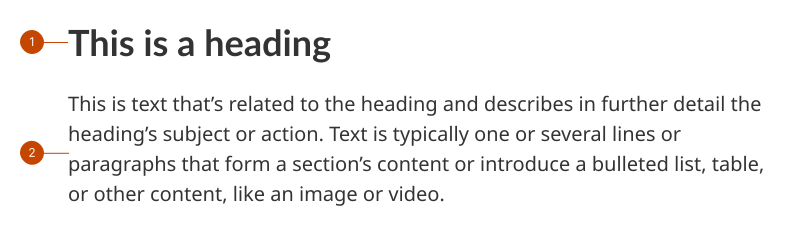
Heading anatomy
Heading is a prominent line of text that introduces the paragraph or other body content that immediately follows it. The visual prominence of the heading decreases based on its level in the hierarchical order. More visual emphasis is given to the first heading, the H1, than a subordinate heading like an H5 or H6. Assistive technologies, such as screen readers, identify headings by their levels.
Text is non-heading content. Its subject matter is related to the idea outlined in its corresponding heading.
Design and accessibility for headings
Order heading levels hierarchically
Heading levels follow a sequential, hierarchical order: higher levels have larger display text than lower ones.
Set correct and consistent heading levels to align the coded and visual headings on a page. Consistent headings support an equitable experience for people who use assistive technologies.
Order headings sequentially from lowest to highest (H1–H6).
Avoid skipping heading levels. Instead, restructure content so headings are used sequentially, from largest (H1) to smallest (H6).
Only use an H1 heading once on a page. Other heading types can be used multiple times.
Use H2 headings to describe individual sections. Each section should have one H2 heading.
Opt to use H3–H6 headings within sections. Sections can contain multiple H3–H6 headings, as long as they are placed in hierarchical order.
Maintain accessible character limits
Maintain the default character limits for each heading line for a comfortable and accessible reading length. These defaults create a balanced, consistent line length across heading font sizes.
Keep character limits to the following lengths to maintain a visual balance across headings on a page:
31 characters for H1.
35 characters for H2.
40 characters for H3.
45 characters for H4.
50 characters for H5.
57 characters for H6.
Write clear and consistent headings
Use sentence case (only the initial letter is capitalized).
Include a single, descriptive H1 heading for each page to convey the page’s content and the purpose of the page’s title.
Use subheadings to break up content. Split the content into smaller sections and group common elements together.
Make each heading distinctive and make it clear what content you’ll find in that section.
When you’ve exhausted available headings and other style elements, consider using font weights to emphasize words in body content.
When writing in English, keep in mind the French headings will be around 30% longer.
Use consistent spacing
Maintain the default spacing for a comfortable and accessible reading experience. These defaults create visual breaks and separation between different sections.
Keep spacing values to the following to maintain a visual balance across headings on a page:
Bottom margin: 300 for all.
Top margin: 0 for H1 and 600 for H2-6.
Help us improve Have questions or a request? Give feedback on our contact form. Something's wrong? Raise it through GitHub with an account. You'll have access to the team's direct responses, progress made on your issue, and issues raised by others. Give feedback Report an issue on GitHub 2026-09-14