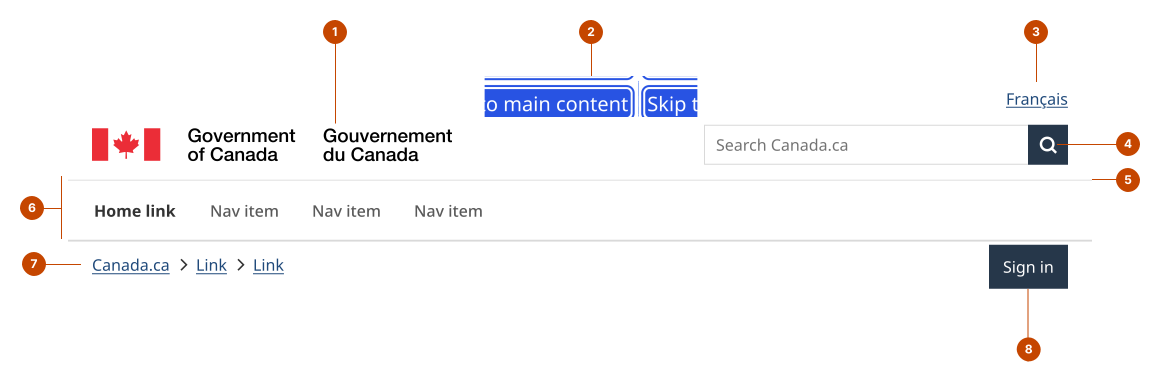
Also called: global header, brand header.The header is the responsive Government of Canada branded header landmark.
Required on Canada.ca
Required on GC sites
GitHub
Figma
Header component preview
Header anatomy
Header elements are required for GC sites unless noted.
The signature is a branding element that identifies a page as a Government of Canada space. On Canada.ca the signature links to the Canada.ca homepage.
The skip-to-content link lets a person pass navigation to go directly to the main content. The link is hidden until a person navigates to it with a keyboard (focus visible).
The language toggle is a link that lets a person switch between French and English content by linking to the other Official Language.
The search lets a person enter keywords or phrases to find content. It can be set to a local or global search form. Optional, except on Canada.ca campaign and standard pages.
The divider line visually separates the main header elements and the page content.
The top navigation is a primary navigation component for access to priority pages. Optional and, when used, sits beneath the divider line of the same colour.
The breadcrumbs lay a path from the current location to each higher level page within the site hierarchy. On Canada.ca the first link leads to the Canada.ca homepage.
The account button (optional) is a component for account-related actions.
Design and accessibility for the header
GC Design System components are designed to adapt to the size of the screen or frame where they’re being viewed. As an exception, the text size in the header and footer is fixed.
Check header requirements
Here’s what’s required for the header on GC sites.
Always preserve the integrity of the Government of Canada signature. Never modify it in any way, stretch it, or change the colours or text.
Always include the following components in the header of a standard or campaign page and maintain the default settings.
Signature that links to Canada.ca.
Language toggle.
Search.
Breadcrumbs that link to Canada.ca from the first link.
Skip-to-content link.
Divider line.
Note: As an exception on legacy applications, the language toggle can be omitted if it results in a destructive action (a person loses their data when language is switched). Opt to include:
An approved program or institution specific search form instead of the global search form.
Account button.
Top navigation.
Improve the accessibility of the header
Set up a skip-to-content link as a shortcut for people using an assistive technology and improve keyboard navigation. The link skips navigation elements to lead directly to the main page content.
Avoid putting other elements ahead of the skip-to-content link. It’s more discoverable if it’s the first or second item.
Include optional elements in your header
Consider using the top navigation for:
services and websites that need a dedicated primary navigation.
services or products that are self-contained and targets an internal audience, like GC Design System.
Consider using the account button for account-related actions, like “Sign in” or “Sign out”.
Help us improve Have questions or a request? Give feedback on our contact form. Something's wrong? Raise it through GitHub with an account. You'll have access to the team's direct responses, progress made on your issue, and issues raised by others. Give feedback Report an issue on GitHub 2026-08-27