Also called: layout, columns, columns layout, grid container.A grid is a responsive, flexible column layout to position elements on a page.
GitHub
Figma
Grid component preview
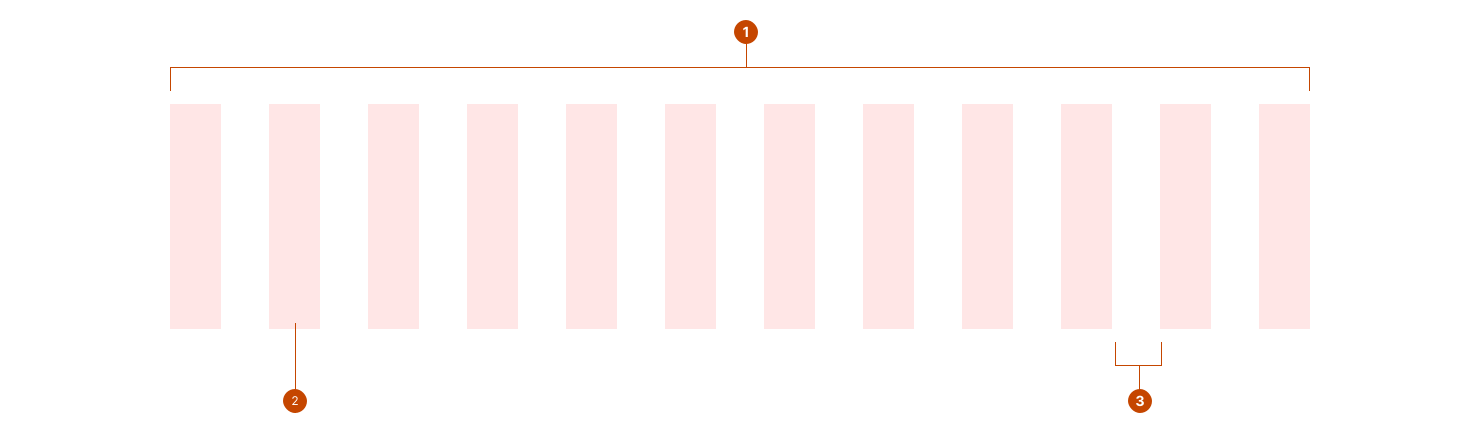
Grid anatomy
The container holds all elements within the grid and spans their combined width. The container is responsive and can be centred.
The column, also called grid item, sets a boundary around its contents to contain it within the width set for that column.
The gap, sometimes called the gutter, defines the width of the space between the columns.
Design and accessibility for grids
Adjust layouts to optimize the experience on different screen sizes
Optimize each grid component for the different screen sizes a person will use — or switch between — when they visit your site or use your product.
Adapt for mobile, tablet, and large screens by defining each viewport layout for that grid component.
Smaller screens, like mobile devices, typically display a single column layout.
Medium-sized screens, like tablets, a single or 2-column layout.
Larger screens, like desktop, a 3- or 4- column layout.
Tip: Keep grid layouts simple by designing for mobile, tablet, and desktop experiences that work with any screen size.
Limit width of content
Keep text line length below 75 characters for a comfortable, accessible reading length.
Limit column width to stop large screens from displaying lines of text that are overly long and difficult to read.
Avoid exceeding the maximum width of 71.25rem (1140px) wide.
Communicate meaning by adjusting spacing
Choose spacing to support ease of reading and help users better understand the messages you’re communicating.
Use smaller spacing tokens to group related concepts together.
Use larger spacing tokens to separate elements into logical groups.
Help us improve Have questions or a request? Give feedback on our contact form. Something's wrong? Raise it through GitHub with an account. You'll have access to the team's direct responses, progress made on your issue, and issues raised by others. Give feedback Report an issue on GitHub 2025-01-22