Also called: file upload, file input, dropzone.A file uploader is a space to select and add supporting documentation.
GitHub
Figma
File uploader component preview
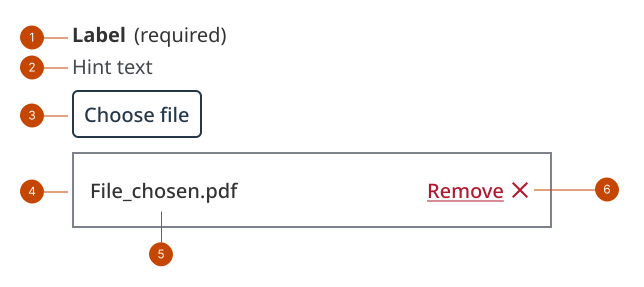
File uploader anatomy
The label provides the instruction for the component.
The hint text presents the types of files and other requirements, like maximum file size.
The button initiates the interface for file selection.
The file list item is a container showing an uploaded file.
The file name shows the name of the file that was added.
The remove button allows an uploaded file to be removed prior to submission.
Design and accessibility for file uploader
Write clear labels and hints
Use the input label to set clear expectations about the kind of file a person can or needs to upload.
Use the hint to specify any upload limitations.
Hide the label only when the purpose is clear
Visually hide the label only when the purpose of the file uploader is clearly communicated by surrounding context, making the label visually redundant, such as in:
tables or other space-constrained layouts
settings and configurations
Always provide a label to support assistive technologies.
Omit hint text if you hide the label, as it can lack context and be distracting or confusing.
Help us improve Have questions or a request? Give feedback on our contact form. Something's wrong? Raise it through GitHub with an account. You'll have access to the team's direct responses, progress made on your issue, and issues raised by others. Give feedback Report an issue on GitHub 2026-02-12