Also called: error list.An error summary is a list of user errors in a form.
GitHub
Figma
Error summary component preview
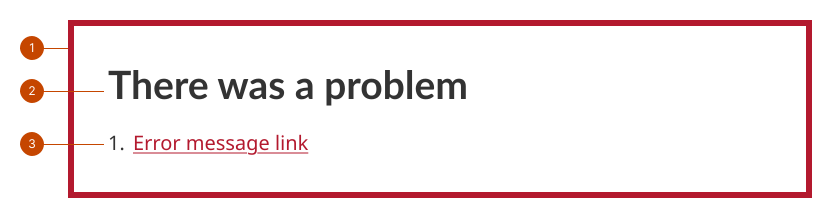
Error summary anatomy
The heading communicates that there’s a problem. This is set by default and can be edited to be more specific.
The error summary is a collection of error messages on the page, listed in order of their appearance on the form.
The error summary item links to the error context and includes the same text as the error message (a call to action statement to address the error).
Design and accessibility for error summaries
Create usable error summaries
Keep in mind that errors interrupt the flow of a person’s action in your product. This can be jarring and uncomfortable.
Provide a clear path to fixing the error. Errors elicit an emotional response that is heightened when the problem is difficult or impossible to resolve.
Make the error message and recovery obvious to get a person back on task and regain momentum.
Keep the error summary list readable with short and specific error messages.
Limit the number of form components on a page that require a response.
Use the error summary with your own component instances
Add error messages for your own (non-GC Design System) component instances in your forms.
Match the error summary item content to each of your error messages.
Order errors in the error summary in the same order that they appear on the form.
Help us improve Have questions or a request? Give feedback on our contact form. Something's wrong? Raise it through GitHub with an account. You'll have access to the team's direct responses, progress made on your issue, and issues raised by others. Give feedback Report an issue on GitHub 2026-09-15