Also called: call to action, CTA.The button is an interactive object that emphasizes an action.
GitHub
Figma
Button component preview
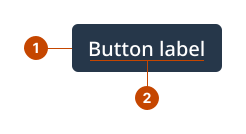
Button anatomy
The container gives the button its visual prominence.
The label states the action that’ll happen when someone interacts with the button. Text is in sentence case, where only the first letter is capitalized.
Design and accessibility for buttons
Make the button findable
Limit the number of buttons on a page. Reserve buttons for the most important actions.
Place buttons in a regular and predictable way.
Avoid making a person needlessly scroll, tab, or type by providing the path to the next action early.
Check the button border’s visibility against the surface where you’re placing it.
Write short, specific, and descriptive button labels
Make the button’s action obvious with a short, specific label that has a verb, or a verb and a noun, like “Submit” or “Get estimate”.
Use sentence case.
Use unique and specific accompanying text to prevent repetition for screen readers.
Use literal phrases. Avoid expressions that may be unfamiliar to non-fluent speakers.
Help us improve Have questions or a request? Give feedback on our contact form. Something's wrong? Raise it through GitHub with an account. You'll have access to the team's direct responses, progress made on your issue, and issues raised by others. Give feedback Report an issue on GitHub 2025-03-25