Also called: breadcrumb trail.Breadcrumbs is a path to the current page from each preceding level of the site's hierarchy.
Required on Canada.ca
GitHub
Figma
Breadcrumbs component preview
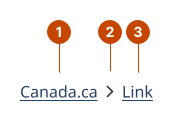
Breadcrumbs anatomy
The first link in the breadcrumbs defaults to the Canada.ca home page. For other sites, the link can be changed.
The chevron separates each link and points to a child link.
The link navigates to a parent-level page.
Design and accessibility for breadcrumbs
Check breadcrumbs requirements
Here’s what’s required for breadcrumbs on GC sites.
Breadcrumbs are required in the header on Canada.ca standard and campaign pages.
Breadcrumbs are optional for other Canada.ca pages and GC sites.
Always include the breadcrumbs in the header of standard and campaign pages on Canada.ca and maintain default settings.
Keep the placement aligned to the left, directly below the divider line.
Keep the Canada.ca homepage as the first link in the breadcrumbs.
Leave out the current page at the end of the breadcrumb trail.
Shorten the link text to improve readability and reduce space.
On a campaign page you can link to a specific landing page as the first link. This could be the Canada.ca home page, the topic tree (Canada.ca topic categories), the institutional/organizational profile, or a campaign index page.
Include the right links in your breadcrumbs
Include only parent page links and leave out the current page. It’s stated in the page title, just beneath the breadcrumbs.
Add up to 3 parent page links if using both the Canada.ca and home page links, for a maximum of 5 breadcrumbs links.
Avoid duplication by linking each breadcrumb to a unique page.
Structure breadcrumb levels based on site navigation
Breadcrumbs represent the location of the current page in relation to the site’s navigation model.
Order breadcrumb levels by their corresponding level in the site’s hierarchy.
Avoid using the breadcrumbs component to show progress through the user journey.
Limit breadcrumbs to 5 levels. Displaying too many levels of breadcrumbs items can be overwhelming.
Tip: If using with other navigation components, like the top navigation and side navigation, align both sets of links, so elements reflect a similar path through the site. This provides a consistent navigation experience and helps visitors understand their current location.
Write specific parent page link text
Make link text clear and specific to help a person decide if they should leave the current page. Spell out where a person will go or what they’ll find when they select a link.
Keep parent link text short (ideally under 20 characters) and distinctive. This helps people scan the links in the breadcrumbs and find what they’re looking for.
Shorten parent page link text to improve readability and reduce space. Where possible, reflect the title of the page in the breadcrumb without including the full page name.
Place breadcrumbs before the main element
Place breadcrumbs at the top of a page, before the main content. This way a skip-to-content link can work to let a person skip all navigation links, including breadcrumbs. Help us improve Have questions or a request? Give feedback on our contact form. Something's wrong? Raise it through GitHub with an account. You'll have access to the team's direct responses, progress made on your issue, and issues raised by others. Give feedback Report an issue on GitHub 2026-07-13