Also called: message, inline message.The alert is an interactive object that communicates important information to the user.
GitHub
Figma
Alert component preview
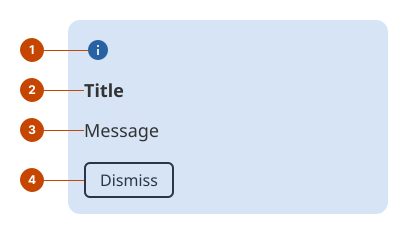
Alert anatomy
The icon (optional) indicates the alert’s role.
The title briefly communicates the main message of the alert.
The message provides details and any available next steps.
The dismiss button (optional) allows people to clear the alert.
Design and accessibility for alerts
Choose the appropriate alert
Refer to the use case tab for guidelines on when to use each alert role.
Use warning and danger alerts only when the message is important and time-sensitive. These use role="alert". A screen reader will interrupt its speech to announce the alert immediately, which can be intrusive.
Use info and success alerts when the message is helpful but not urgent. These use role="status". A screen reader will announce the alert at the next available opportunity, without interrupting its current speech.
Place the alert where it’s most relevant
When the alert appears after a person’s action, place it inline, close to where the action occurred. For example, place it just after a button that may reveal important new information.
When the alert is prompted on page refresh or by a server event, and you do not know where the person is on the page, place the alert at the top of the page.
Avoid using an alert within a form component, like an input or a checkbox.
Write concise and descriptive titles and messages
Include the most important piece of information in the title, so that the purpose of the alert is obvious.
Keep the message concise, using no more than two sentences.
Write a message that provides complementary information to the title. Avoid repeating or rephrasing the title.
Describe the impact on the user, and provide a clear next step, when one is available.
Include a link or another resolution path when it helps people address the issue described in the alert.
Consider adding a dismiss button
Add a dismiss button when people can continue their task without acting on the alert. This is often appropriate for info and success alerts.
Omit the dismiss button when people must resolve an issue before they can continue. This is often appropriate for danger alerts.
Consider omitting the dismiss button if you’re already using another button in the message, to maintain a clear layout.
Avoid unnecessary alerts
Only use an alert when the information is important enough to warrant additional attention. Avoid repeating information that’s already on the page.
Avoid displaying more than one alert at the same time. Combine them if they’re about the same topic, or pick the alert with the highest priority.
Help us improve Have questions or a request? Give feedback on our contact form. Something's wrong? Raise it through GitHub with an account. You'll have access to the team's direct responses, progress made on your issue, and issues raised by others. Give feedback Report an issue on GitHub 2026-09-09