Spacing
Spacing helps position elements onscreen and in components.
On this page
Spacing system
GC Design System uses a consistent spacing system based on vertical rhythm and a base size.
Vertical rhythm aligns text to evenly spaced horizontal lines in repeated patterns. Consistent vertical spacing helps make content easier to scan, read, and understand.
Spacing sizes are configured with rem units. All spacing sizes are relative to a base size of 1.25rem (20px) and what we use to calculate all typography and spacing values.
The spacing system is represented by global tokens.
Browse spacing tokens
Using spacing
Choose spacing based on relationships
- Use smaller spacing tokens to group related concepts together.
- Use larger spacing tokens to separate elements into logical groups.
- Whenever possible, line objects up both vertically and horizontally.
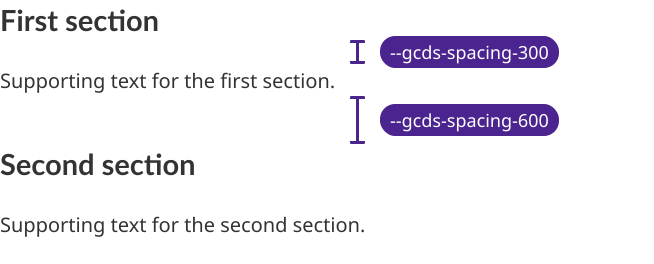
Choose how to apply spacing
Use spacing values from the GC Design System scale to maintain consistency.
- Use the grid component to arrange elements and control the spacing between them. Its
gap attributes accept values from 150 to 800, corresponding to GC Design System spacing tokens.
- Use CSS Shortcuts to apply margin and padding. CSS Shortcuts use GC Design System spacing tokens.
- If a CSS Shortcuts class does not cover your need, use a global spacing token in your custom CSS.
Apply spacing
Learn how to use CSS Shortcuts or design tokens to apply GC Design System decisions in your designs and code.
Use CSS ShortcutsUse design tokens
Spacing token reference
| Preview | Token name | Pixel | Rem |
| | --gcds-spacing-0 | 0px | 0rem |
| | --gcds-spacing-25 | 2px | 0.125rem |
| | --gcds-spacing-50 | 4px | 0.25rem |
| | --gcds-spacing-75 | 6px | 0.375rem |
| | --gcds-spacing-100 | 8px | 0.5rem |
| | --gcds-spacing-125 | 10px | 0.625rem |
| | --gcds-spacing-150 | 12px | 0.75rem |
| | --gcds-spacing-175 | 14px | 0.875rem |
| | --gcds-spacing-200 | 16px | 1rem |
| | --gcds-spacing-225 | 18px | 1.125rem |
| | --gcds-spacing-250 | 20px | 1.25rem |
| | --gcds-spacing-300 | 24px | 1.5rem |
| | --gcds-spacing-350 | 28px | 1.75rem |
| | --gcds-spacing-400 | 32px | 2rem |
| | --gcds-spacing-450 | 36px | 2.25rem |
| | --gcds-spacing-500 | 40px | 2.5rem |
| | --gcds-spacing-550 | 44px | 2.75rem |
| | --gcds-spacing-600 | 48px | 3rem |
| | --gcds-spacing-650 | 52px | 3.25rem |
| | --gcds-spacing-700 | 56px | 3.5rem |
| | --gcds-spacing-750 | 60px | 3.75rem |
| | --gcds-spacing-800 | 64px | 4rem |
| | --gcds-spacing-850 | 68px | 4.25rem |
| | --gcds-spacing-900 | 72px | 4.5rem |
| | --gcds-spacing-950 | 76px | 4.75rem |
| | --gcds-spacing-1000 | 80px | 5rem |
| | --gcds-spacing-1050 | 84px | 5.25rem |
| | --gcds-spacing-1100 | 88px | 5.5rem |
| | --gcds-spacing-1150 | 92px | 5.75rem |
| | --gcds-spacing-1200 | 96px | 6rem |
| | --gcds-spacing-1250 | 100px | 6.25rem |
Help us improve Have questions or a request? Give feedback on our contact form. Something's wrong? Raise it through GitHub with an account. You'll have access to the team's direct responses, progress made on your issue, and issues raised by others. Give feedback Report an issue on GitHub 2026-11-02