Search
<gcds-search>
Also called: search bar, site search box, search field.
Search is a space for entering keywords to find relevant information.
-
Required on Canada.ca
-
GitHub -
Figma
Search component preview
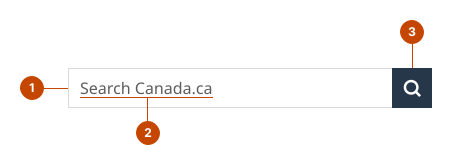
Search anatomy
- The input field is a space to enter search keywords.
- The placeholder text is a prompt visible before a person types. It identifies the search area.
- The button, labelled with a magnifying glass, initiates a search.
Design and accessibility for search
Check search requirements
Here’s what’s required for search on GC sites.
- Search is required in the
header on Canada.ca standard and campaign pages. - It's optional for other Canada.ca pages and GC sites.
- Use default GC Search indexing.
- Set indexing across Canada.ca content or at an institution or program level.
- Use “Search Canada.ca” as the search prompt text in English.
- Use “Rechercher dans Canada.ca” as the search prompt text in French.
- Use “Search [institution/program/product]” as the search prompt text in English.
- Use “Rechercher dans [institution/programme/produit]” as the search prompt text in French.
- Avoid acronyms unless necessary to shorten text for visual accessibility.
Opt to set up an additional search
- If a secondary search is needed with other datasets, place that search within the content area of the page.
- Clearly identify the search area, so a person searching understands the constraints ahead of time.
Help us improve
Have questions or a request? Give feedback on our contact form.
Something's wrong? Raise it through GitHub with an