File uploader
<gcds-file-uploader>
Also called: file upload, file input, dropzone.
A file uploader is a space to select and add supporting documentation.
-
GitHub -
Figma
File uploader component preview
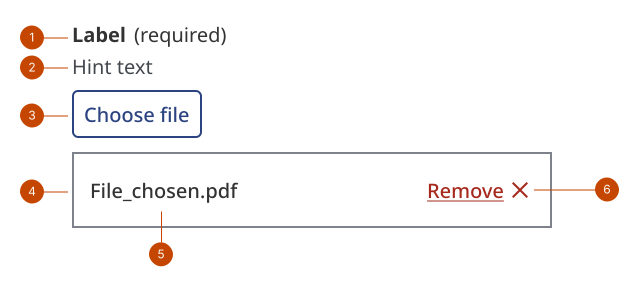
File uploader anatomy
- The label provides the instruction for the component.
- The hint text presents the types of files and other requirements, like maximum file size.
- The button initiates the interface for file selection.
- The file list item is a container showing an uploaded file.
- The file name shows the name of the file that was added.
- The remove button allows an uploaded file to be removed prior to submission.
Design and accessibility for file uploader
Write clear labels and hints
- Use the input label to set clear expectations about the kind of file a person can or needs to upload.
- Use the hint to specify any upload limitations.
Hide the label only when the purpose is clear
- Visually hide the label only when the purpose of the file uploader is clearly communicated by surrounding context, making the label visually redundant, such as in:
- tables or other space-constrained layouts
- settings and configurations
- Always provide a label to support assistive technologies.
- Omit hint text if you hide the label, as it can lack context and be distracting or confusing.
Help us improve
Have questions or a request? Give feedback on our contact form.
Something's wrong? Raise it through GitHub with an